It usually starts with that sudden, sinking feeling in your stomach.
You take your phone to a local repair shop because it stopped charging, and twenty minutes later, the technician hands it back across the counter with a sympathetic nod: "The logic board is dead. You’re going to need a brand-new phone."
If your photos, messages, and work files aren't backed up to the cloud, that sentence feels like hitting a brick wall. But here’s something most people don't realize: in the modern tech world, a "dead board" isn't the final verdict it used to be. More often than not, it just means the fix is too small for a quick screw-driver-and-part-swap job.
This is where microsoldering comes in.
Instead of writing off the entire brain of your device—or handing over a small fortune for a replacement—microsoldering lets a technician slide your phone under a microscope, find the single microscopic component that failed, and carefully solder a fresh one into place.
Here is a plain-English breakdown of how motherboard repair actually works, why it matters, and when it’s your best shot at bringing a dead device back to life.
What is microsoldering in phone repair?
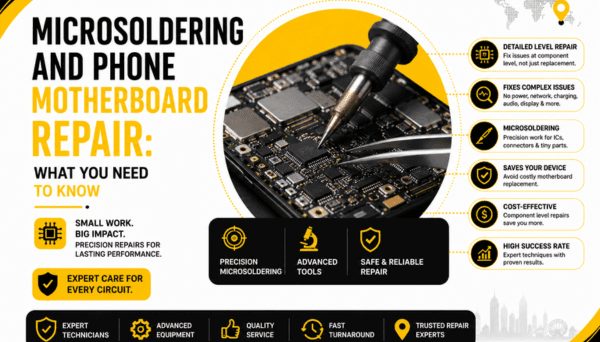
At its core, microsoldering is high-precision micro-surgery for electronics. It’s the process of diagnosing and repairing tiny surface-mount components, broken copper lines, and multi-pin chips soldered directly onto your phone’s main circuit board.
To put the scale into perspective, many of the capacitors and resistors sitting inside an iPhone or Samsung are smaller than a single grain of rice or a flake of coarse black pepper. You can't fix these with a standard hardware-store soldering iron and steady eyes.
A proper microsoldering bench relies on specialized gear:
- Trinocular Stereo Microscopes: To magnify the board up to 40x or 50x so tiny solder joints look like sturdy metal blocks.
- Micro-Soldering Irons: Fitted with needle-thin tips that deliver precise, localized heat without melting the delicate components right next to them.
- Hot-Air Rework Stations: To lift multi-pin chips off the board using carefully controlled temperature curves and gentle airflow.
- Thermal Cameras & Bench Power Supplies: To watch electricity move through the board and catch shorted components heating up in real-time.
It takes a mix of electrical problem-solving and an extremely steady hand. One slip can tear a trace out of the board, but in trained hands, these tools can wake up a phone that seemed entirely dead.
How does chip-level phone repair work?
Standard phone repair is mostly mechanical—unscrew a bracket, pop off a flex cable, swap out a screen or battery, and button it back up. Chip-level repair is different. It’s pure diagnostic detective work.
Instead of guessing, a technician works through a logical sequence:
- Reading the Symptoms: The phone's power draw tells a story. Is it pulling zero power from the cable? Is it stuck drawing a faint 0.05 amps? Every small variation points toward a specific circuit.
- Testing Voltage and Resistance: Using a multimeter, the tech checks circuit lines to see where electricity is flowing—and where it’s getting blocked by a "short circuit" jumping straight to ground.
- Tracing the Schematics: By comparing the physical board against digital board blueprints (which show every hidden layer and component value), the tech pinpoints the exact chip or filter that gave out.
- Replacing the Component: Under high magnification, the failed component is lifted with hot air, the underlying copper pads are prepped with fresh solder, and a healthy replacement is set in place.
- Testing the Circuit: The board goes back on a bench power supply to verify normal electrical behavior before everything is reassembled.
Why does a phone need motherboard repair?
A phone needs board-level work when basic part replacements don't change anything. You can slap a fresh screen and a brand-new battery onto a frame, but if the motherboard can't route power or pass data signals, the screen will stay pitch black.
Common symptoms that trace directly to motherboard issues include:
- Refusing to Charge: The phone won't charge or recognize a cable, even after installing a brand-new charging port and battery (a classic sign of a blown power/USB controller chip).
- Completely Dead / No Power: The phone shows zero life, won't turn on, and might get uncomfortably warm in one specific spot when plugged in.
- Dark Screen with Background Life: You hear notification dings and feel vibrations, but the screen stays totally dark—even with a working display attached (often a blown display driver or backlight filter).
- Boot Loops: The phone powers on, gets stuck on the Apple or Samsung logo, and continuously restarts because a key power line fails to initialize.
- Unresponsive Touch Input: The glass screen is pristine, but touch freezes up entirely or shows flickering grey bars across the top display edge.
What causes a phone motherboard to stop working?
Smartphone logic boards are dense, multi-layered sandwiches of fiberglass, copper traces, and delicate solder joints. They're resilient, but everyday life can easily throw them off balance.
- Hard Drops and Impact Shock: Even if your front glass doesn't crack, the shockwave of a drop ripples through the chassis. That impact can snap delicate solder joints underneath heavy chips or tear tiny copper pads right off the board.
- Liquid Damage and Corrosion: Water and live current don't mix. Moisture creates rapid electrical shorts that burn out tiny components and leave behind crusty mineral deposits that eat through metal leads.
- Cheap, Uncertified Chargers: Bargain gas-station chargers and low-quality car adapters often lack proper voltage protection. A sudden surge down the cable can instantly fry sensitive power management chips.
- Extreme Heat: Heat from heavy gaming, direct summer sun on a dashboard, or constant fast-charging can degrade older solder joints over time until a connection breaks.
- DIY Slip-ups: Prying at a connector with a metal tool or putting the wrong screw back into the wrong hole can crush invisible circuit layers running just beneath the board's surface.
Can a damaged phone motherboard be repaired without replacing it?
Yes, absolutely—and far more often than people think.
A "damaged motherboard" almost never means the entire board is destroyed. Usually, 99% of the board is completely fine, but one tiny 5-cent capacitor shorted out, or one power chip took a hit. By finding and swapping just that single component, the rest of the board springs back to life.
A successful repair usually comes down to three things:
- Where the damage is: Failed power chips, broken traces, or shorted filters are straightforward fixes. But if the main CPU or the encrypted storage chip itself is cracked or internally fried, the board cannot be saved.
- How severe liquid corrosion is: Light to moderate liquid damage is very fixable after an ultrasonic bath and component cleanup. Severe corrosion that has eaten through multiple inner layers of the board is a different story.
- Physical board cracks: A bent or snapped logic board that cuts through internal circuit paths generally can't be repaired for daily use, though recovering your photos might still be possible by moving the key chips onto a donor board.
What is the difference between board-level repair and motherboard replacement?
This distinction is massive—especially if you care about keeping what’s stored on your device.
Board-Level Repair
- How it works: A technician keeps your original board, fixing the specific broken circuit under a microscope.
- Data outcome: Your photos, messages, apps, and contacts stay right where they are. Because your original storage chip never leaves the phone, your data remains completely intact.
- Practical benefits: It’s often much cheaper than a full board swap and preserves paired security features like Face ID or Touch ID.
Motherboard Replacement
- How it works: The old board is taken out and thrown away, and a totally different board is installed.
- Data outcome: Your personal data is gone forever. A new board means a blank storage drive with factory settings.
- Practical benefits: Useful if the original board is structurally snapped beyond recovery, but it can be almost as expensive as buying a used phone.
If keeping your personal files matters to you, attempting board-level repair first is almost always the smarter move.
PRC Repair Offers Professional Microsoldering and Motherboard Repair Services
When a traditional repair shop tells you your phone is a "write-off," getting a second opinion from a specialized board technician can change the outcome completely.
At PRC Repair, we provide professional microsoldering and motherboard repair services right here in Australia. Equipped with high-magnification optics, thermal imaging gear, and specialized diagnostic tools, our technicians focus on solving complex hardware faults that simple part swaps can't touch.
Whether your phone took an unexpected dive into water, refuses to take a charge, or won't turn on long enough for you to rescue irreplaceable photos, our focus is on pinpointing the actual fault and restoring your original board.
Why Choose Professional Microsoldering Repair?
Working on a smartphone's mainboard requires serious bench experience, precision heat control, and deep circuit knowledge. Guessing with a generic heat gun or an untamed soldering iron almost always results in warped board layers, melted connectors, or permanent data loss.
By trusting an experienced microsoldering team:
- You get a clear, diagnostic-led explanation of what actually broke.
- You give your unbacked-up photos and files the best possible chance of survival.
- You avoid spending top dollar on a new phone when a small board fix can get your current one running again.
- You keep a fully capable piece of tech out of the e-waste pile.
When Should You Consider Microsoldering Repair?
It’s a good time to get a professional motherboard assessment if:
- Your phone is completely dead and won't respond to a known-working battery.
- You’ve already replaced the charging port, but the phone still won't draw power or connect to a computer.
- The device suffered liquid damage and won't turn on after drying out.
- The screen stays completely dark, but you can still hear dings and feel vibrations in the background.
- The phone gets uncomfortably hot in one specific spot the moment you plug it into a charger.
- You urgently need important data off a phone that won't stay powered on long enough to perform a cloud backup.
Final Thoughts
Microsoldering has completely rewritten what "unfixable" means in the tech world. A phone that won't turn on isn't necessarily trash—it's often just a device with a single broken line or a faulty $2 chip waiting for someone with the right tools to spot it.
Before you accept that your data is lost or pony up for a brand-new device, getting a diagnostic check from PRC Repair gives your phone a real fighting chance. Sometimes, the only thing standing between a "dead" phone and a working one is finding that tiny component under the lens.
Express Phone Repair & Protective Accessories Near Me: Western Sydney & North West Sydney
Looking for fast, walk-in phone repairs or durable device protection near Sydney & Surrounding Suburbs? Phone Repair Centre operates two dedicated Sydney locations: our flagship diagnostic laboratory at 122 Queen Street, St Marys, and our express kiosk at Schofields Village. We combine 30-minute hardware fixes with complimentary bubble-free screen protector application and premium mobile accessories in stock every day.
Express Walk-in Repairs (30 to 45 Mins)
- Screen & OLED Replacement: iPhone, Samsung Galaxy, Google Pixel, and iPad display renewals with True Tone preservation.
- Battery Renewal: High-capacity replacement cells installed same-day with store warranty.
- Charging Port & Audio Fixes: USB-C and Lightning port cleaning, debris removal, or micro-soldering replacement.
- Laser Back Glass Repair: Clean rear glass replacement with factory-tight seal alignment.
- Strict Zero Data Loss: Your photos, banking apps, and personal data stay untouched throughout the repair.
In-Store Protection & Accessories
- Free Screen Protector Fitting: 9H tempered glass, anti-peeping privacy protectors, and hydrogel films applied bubble-free by our technicians.
- Drop-Proof & MagSafe Cases: Shock-absorbent military-grade covers, crystal-clear cases, and magnetic wallet folios for all popular models.
- High-Speed Power & Cables: 20W to 65W Power Delivery (PD) wall adapters, braided USB-C and Lightning cables, and magnetic wireless car mounts.
- Camera Lens Armor: Scratch-resistant sapphire glass lens protectors for multi-lens camera systems.
- Instant PayID Phone Buyback Desk (St Marys): 10-minute Osko PayID bank payout or +$50 AUD PRC Store Credit for unlocked or cracked phones if you prefer to sell or trade in rather than repair.
Drive Times & Proximity Catchment
St Marys Workshop (Western Sydney Hub):
• Penrith: 10 mins via Great Western Highway
• Mount Druitt: 6 mins via Carlisle Avenue
• Blacktown: 15 mins via M4 or Great Western Highway
• St Clair & Erskine Park: 7 mins via Bennett Road
Schofields Express (North West Sydney Hub):
• Rouse Hill & The Ponds: 6 to 8 mins via Schofields Road
• Tallawong & Box Hill: 5 to 9 mins via Boundary Road
• Marsden Park: 8 mins via Richmond Road
• Kellyville & Stanhope Gardens: 10 mins
Quick Answer: Where can I find phone repair, starting-from prices, and exact part tier quotes in Sydney & Surrounding Suburbs?
Phone Repair Centre offers same-day walk-in repairs at 122 Queen Street, St Marys (standalone street-front shop on Queen Street, phone (02) 8678 3298) and express repairs 7 days a week at Schofields Village (Kiosk 1/227 Railway Terrace, phone (02) 7238 1732). Screen repairs start from $85 AUD (iPhone) and $119 AUD (Samsung/iPad), batteries from $79 AUD, PS5 HDMI micro-soldering $169 AUD, and diagnostics $88 upfront (credited if proceeding). Because we stock Tested Quality Aftermarket / Incell, Premium Soft OLED, and OEM / Refurbished display options on our website, chat with Sam 24/7 via Website Live Chat (/instant-quote), WhatsApp (+1 555-955-6234), Facebook Messenger, or Instagram Direct for your exact tier-by-tier quote.


